How to Do a Backlink Audit: Step-by-Step
A backlink audit reveals toxic links, anchor text problems, and competitor opportunities. Here's how to run one from start to finish.

A backlink audit is a systematic review of every external link pointing to your website. Done properly, it tells you what's helping your rankings, what might be hurting them, and where your competitors are getting their best links while you're not.
Most SEO professionals recommend running a backlink audit at least twice a year — and immediately following any significant traffic drop that coincides with a Google core update. For sites that have been live for more than three years or have engaged in historical link building campaigns, the audit often surfaces problems that have been quietly suppressing rankings for months.
Why Backlink Audits Matter
Links are among the most powerful ranking signals in search, which also makes them a vector for problems. Two categories of backlink issues affect rankings:
Toxic links: Links from spam domains, private blog networks (PBNs), irrelevant link farms, or sites penalized by Google can dilute your site's authority or, in severe cases, trigger manual penalties. Google's Spam Brain classifier runs continuously and processes link data on an ongoing basis, so toxic links don't just sit inertly — they're being actively evaluated.
Over-optimized anchor text: If a disproportionate number of your inbound links use exact-match keyword anchors (e.g., "best SEO agency Philippines" appearing as the anchor on dozens of backlinks), that pattern can trigger algorithmic over-optimization penalties. Natural link profiles have diverse anchor text distributions.
Beyond risk management, audits surface competitive intelligence. Knowing which links your competitors have that you don't points directly to acquisition opportunities.
Understanding the full role of backlinks in SEO — their types, quality signals, and how they're earned — is covered in the foundational guide to what link building is and how it works.
Tools Required
A thorough backlink audit requires at least two data sources, because no single tool has a complete index of the web.
Google Search Console (free): The most authoritative source for your own site's backlink data, since it reflects what Google has actually crawled and processed. Limited in depth but authoritative. Access via Links → Top linking sites and External links.
Ahrefs: The largest third-party backlink index, updated frequently. Offers the most comprehensive view of your link profile, competitor comparisons, and historical link data. Paid subscription required.
SEMrush: Strong backlink database with toxic link scoring built into its Backlink Audit tool. Useful for identifying potentially harmful links with less manual work.
Majestic: Alternative backlink index with its own Trust Flow and Citation Flow metrics. Good as a cross-reference for Ahrefs data.
Running a full audit typically uses Google Search Console as the baseline, Ahrefs as the primary research tool, and SEMrush as a secondary cross-check for toxicity scoring.
A professional SEO audit typically includes backlink analysis as a component alongside technical and on-page audits.
Step 1: Export Your Full Backlink Profile
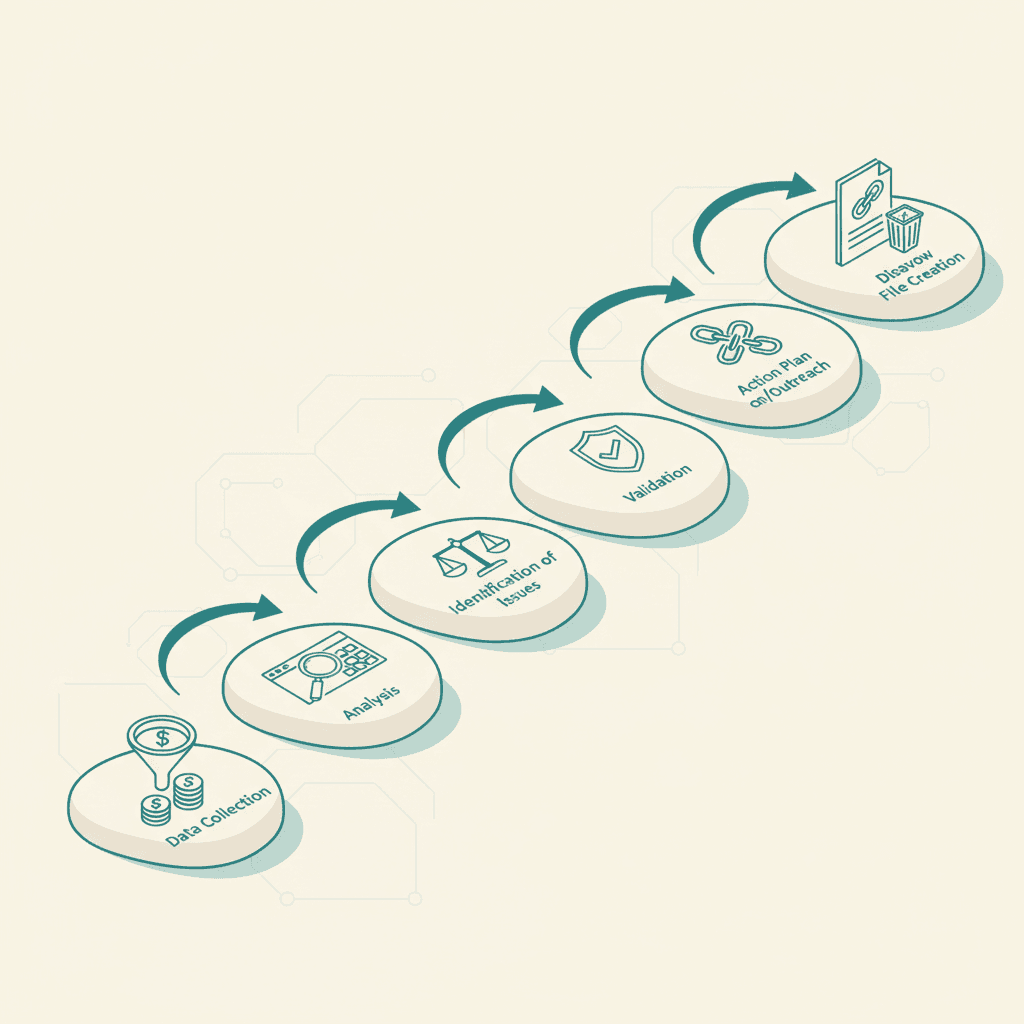
Begin by exporting your complete backlink data from each tool.
In Google Search Console: Navigate to Links → External links → More (under "Top linking sites") → Download. This gives you a list of domains that Google has seen linking to your site.
In Ahrefs: Go to Site Explorer → Backlinks → export to CSV. For large sites (10,000+ backlinks), use the Referring Domains export first to get a manageable domain-level view, then drill into specific domains that look problematic.
In SEMrush: Use the Backlink Audit tool, which automatically fetches and categorizes your backlinks with toxicity scores.
Combine these datasets. URLs appearing in Google Search Console but not Ahrefs (and vice versa) represent the gaps between index coverage. For audit purposes, anything in Search Console is the priority — Google has seen it.
Step 2: Categorize Your Referring Domains
With your full dataset, segment referring domains into quality tiers.
Tier 1 — Valuable: High-authority, topically relevant domains that are clearly editorial. These are assets you want to protect and understand.
Tier 2 — Neutral: Average or unknown domains — local directories, niche blogs with small audiences, guest post placements with real content. Not harmful but not your best links either.
Tier 3 — Suspicious: Domains with clear spam signals: very low Domain Rating combined with no real content, obvious link farm structure, foreign-language sites with no topical connection to your content, or sites already flagged by Ahrefs/SEMrush spam scoring.
Tier 4 — Toxic: Domains with strong evidence of manipulation: known PBN networks, sites with algorithmic penalties, adult or gambling sites with no topical connection, or sites whose entire existence is to sell links.
Most backlink profiles for sites that have been live for 3+ years will have some Tier 3 and occasionally Tier 4 links. This is normal. The question is whether these low-quality links constitute a meaningful portion of the profile or just noise.
Step 3: Analyze Anchor Text Distribution
Anchor text over-optimization is one of the most common backlink problems and one of the easiest to miss without a dedicated analysis.
In Ahrefs, navigate to Anchors under your Site Explorer report. Look at the distribution across:
- Branded anchors (your business name, domain name) — should be a significant portion
- Naked URL ("example.com", "visit example.com") — normal and healthy
- Generic anchors ("click here", "read more", "this article") — normal
- Partial-match keywords ("SEO tips", "link building guide") — acceptable in reasonable proportions
- Exact-match keywords ("seo agency philippines", "buy backlinks cheap") — red flags if disproportionate
A healthy anchor profile looks roughly like this: 30–50% branded, 20–30% naked URL or generic, 20–30% partial-match or topical, with exact-match comprising less than 10% of the total.
Exact-match keyword anchors exceeding 20–25% of the profile, especially on commercially valuable terms, is a pattern associated with over-optimization penalties. The solution is building more diversified links going forward, not necessarily disavowing the existing ones (unless they come from toxic domains).
Step 4: Identify Lost Links
Ahrefs and SEMrush both track link history. Review links that were previously active but have now been lost — either because the linking page was taken down, the link was removed by the webmaster, or the page returned a 404 error.
Lost links from high-quality domains are worth pursuing for re-acquisition. If a major industry publication previously linked to a page that you've since changed, you may be able to request the link be updated.
Alternatively, if your own pages have changed URLs without proper 301 redirects in place, links may be pointing to dead pages. These should be addressed with redirects before investing in new link acquisition.
Step 5: Competitor Comparison
This is where the audit transitions from defensive to offensive.
Using Ahrefs' Link Intersect tool (or SEMrush's Backlink Gap tool), compare your backlink profile against 3–5 competitors. The tool shows which domains link to your competitors but not to you.
These domains are your highest-priority prospecting list for link acquisition. They've already demonstrated willingness to link to sites in your niche — the remaining question is whether you have content worth linking to.
Pay particular attention to competitors' links from:
- Industry publications and associations
- Regional business directories specific to the Philippines or your local market
- University or government sites (.edu, .gov)
- Resource pages and tool directories
Understanding white-hat link building strategies helps translate this prospecting data into an actionable outreach campaign.
Step 6: Identify Toxic Links for Disavowal
Based on your categorization in Step 2, compile a list of Tier 4 (toxic) links that you believe could be harming your site. For each domain, determine:
- Is this link on a page with obvious spam signals?
- Is the site part of an identifiable link scheme or PBN?
- Does the anchor text look manipulative?
- Does the site have any real traffic or editorial value?
If the answers are yes/yes/yes/no, the domain is a disavowal candidate.
Before disavowing: Attempt manual removal first. This means finding contact information for the domain owner and requesting the link be removed. Document these attempts — Google expects evidence of removal attempts before disavowal.
Creating the disavow file: Google's Disavow Links tool accepts a text file with one URL or domain per line. Use domain-level disavow (e.g., `domain:spamsite.com`) rather than page-level for efficiency when the entire domain is problematic.
Submit via Google Search Console: Navigate to the Disavow Links tool (search for "disavow" in the Help Center for the current URL, as Google moves this tool periodically) and upload your file.
Be conservative with disavowal. Incorrectly disavowing high-quality links removes authority from your site. When uncertain, leave the link out of the disavow file. The threshold for disavowal should be clear evidence of manipulation, not just low DR.
Step 7: Review Internal Link Equity Distribution
A backlink audit is incomplete without reviewing how link equity flows through your site once it arrives.
When high-authority external links point to one or two pages but those pages don't internally link to your core money pages, you're leaving authority on the table. Check that your most-linked pages pass equity to the pages that matter most for rankings.
Tools like Ahrefs' Internal Backlinks report and Screaming Frog's crawl data show internal link distributions. Pages with high external link equity and few internal links from that page to other priority pages are optimization opportunities.
Step 8: Establish a Monitoring Cadence
A backlink audit isn't a one-time project. New links are being acquired (and lost) constantly, and toxic links can appear organically as spam sites crawl the web and link to random destinations.
Set up:
- Ahrefs or SEMrush alerts for new referring domains (review monthly)
- Google Search Console monitoring for manual action notifications (any email from Google Search Console warrants immediate attention)
- Quarterly mini-audits reviewing new links from the previous 90 days
- Annual full audits with complete competitor comparison
A professional link building service typically includes ongoing backlink monitoring as part of ongoing campaign management, so that new toxic links are caught and addressed before they accumulate.
When to Use a Professional Audit Service
Manual backlink audits are time-intensive. A thorough audit of a site with 5,000+ referring domains can take 20–40 hours of analyst time, including data collection, categorization, anchor text analysis, and disavow file preparation.
For sites that have experienced traffic drops following Google updates, have historical involvement in black-hat link building, or are in highly competitive niches where backlink profiles are scrutinized more carefully, a professional SEO audit service brings both the tools and the pattern-recognition experience to identify problems quickly.
For smaller sites with cleaner histories, the step-by-step process above is manageable with access to Ahrefs or SEMrush. The audit tools summarized in the SEO audit tools guide provide the technical infrastructure needed for each stage. A backlink audit is most valuable when integrated into a broader SEO strategy — link quality improvements compound with technical and on-page gains to produce sustained ranking results.
Frequently Asked Questions
How often should I audit my backlinks?+
A full audit twice per year is the standard recommendation. Additionally, run a mini-audit any time organic traffic drops significantly following a Google update, and set up ongoing monitoring alerts so new toxic links are caught quickly rather than allowed to accumulate.
Does disavowing links actually help rankings?+
Disavowing links helps in two specific scenarios: when there's a manual penalty for unnatural links (Google notifies you via Search Console), and when algorithmic demotion is clearly linked to a toxic backlink profile. For sites without these specific issues, disavowing neutral or low-quality links rarely produces ranking improvements and carries some risk of accidentally removing legitimate links.
What's the difference between a referring domain and a backlink?+
A backlink is a specific hyperlink pointing to your site. A referring domain is the website hosting that link. One referring domain can have multiple backlinks (many pages on the same site linking to you). In link building, referring domains is the more meaningful metric — 100 links from one domain count less than 100 links from 100 different domains.
How do I find toxic backlinks?+
SEMrush's Backlink Audit tool assigns toxicity scores automatically. In Ahrefs, look for low-DR domains with obvious spam signals: no real content, obvious link farm structure, irrelevant topics, or pattern matching with known PBN networks. Google Search Console doesn't score links but is authoritative about which links Google has seen.
What happens if I don't disavow toxic links?+
Most sites have some low-quality or spammy backlinks and rank fine. Google's algorithms are designed to ignore rather than penalize most natural link spam. Disavowal is primarily relevant when there's evidence of algorithmic penalty (traffic crash after an update that correlates with your backlink profile) or a manual action. Pre-emptive disavowal of all low-quality links is generally unnecessary and can be counterproductive.